Best Way to Summarize an Article in 2026 — I Tested 7 Tools
Every AI tool now claims to be the best way to summarize an article. We got tired of the marketing copy, so we ran a real, public, recent news article through seven of the most-used summarizers — including a manual human summary as a control — and recorded what each one actually produced. One hallucinated a detail that wasn't in the article. Two had user interfaces so broken we couldn't get a summary out of them at all. Here are the unedited results.
The test setup
Article: a GamingBible news piece about a free fan-made Star Wars game launching on May the Fourth, built inside Fortnite's UEFN editor. ~900 words, public, no paywall, published the week of testing.
Methods tested: ToneSummary (5 tones in one batch), ChatGPT, Google Gemini, Claude, a manual human summary, TLDR This, and QuillBot.
What we measured: did it produce a summary, was the summary accurate to the source, and could a normal user actually figure out how to use the tool?
1. ToneSummary — 5 tones in one batch, all accurate
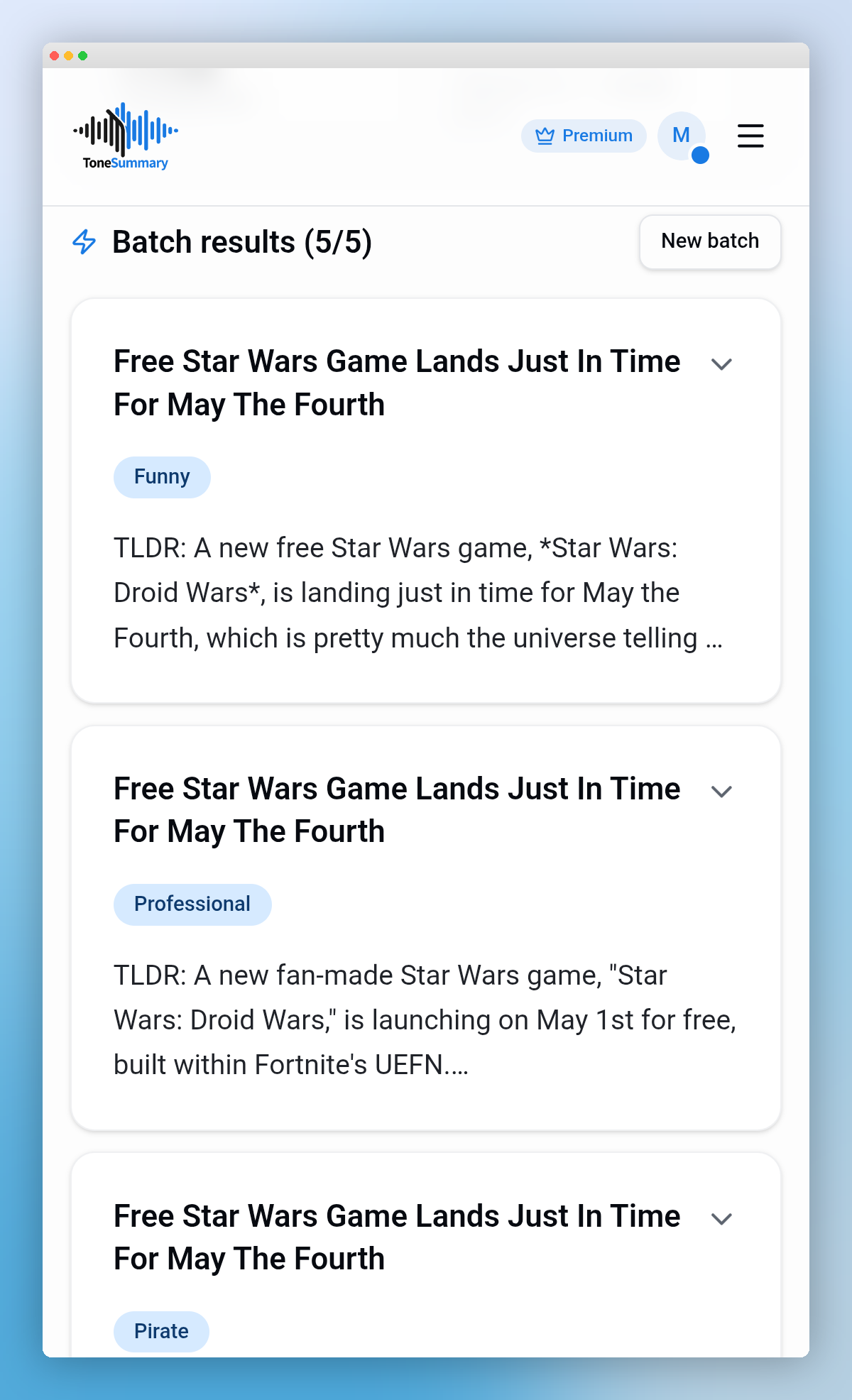
Paste URL, pick five tones (Professional, Casual, Funny, Sarcastic, Pirate), one click. All five summaries returned together in a single batch view, each collapsed into a preview card you can expand. Every summary captured the same core facts — fan-made Star Wars game, May 1st release, built in Fortnite UEFN, nine droid loadouts — but in completely different voices.
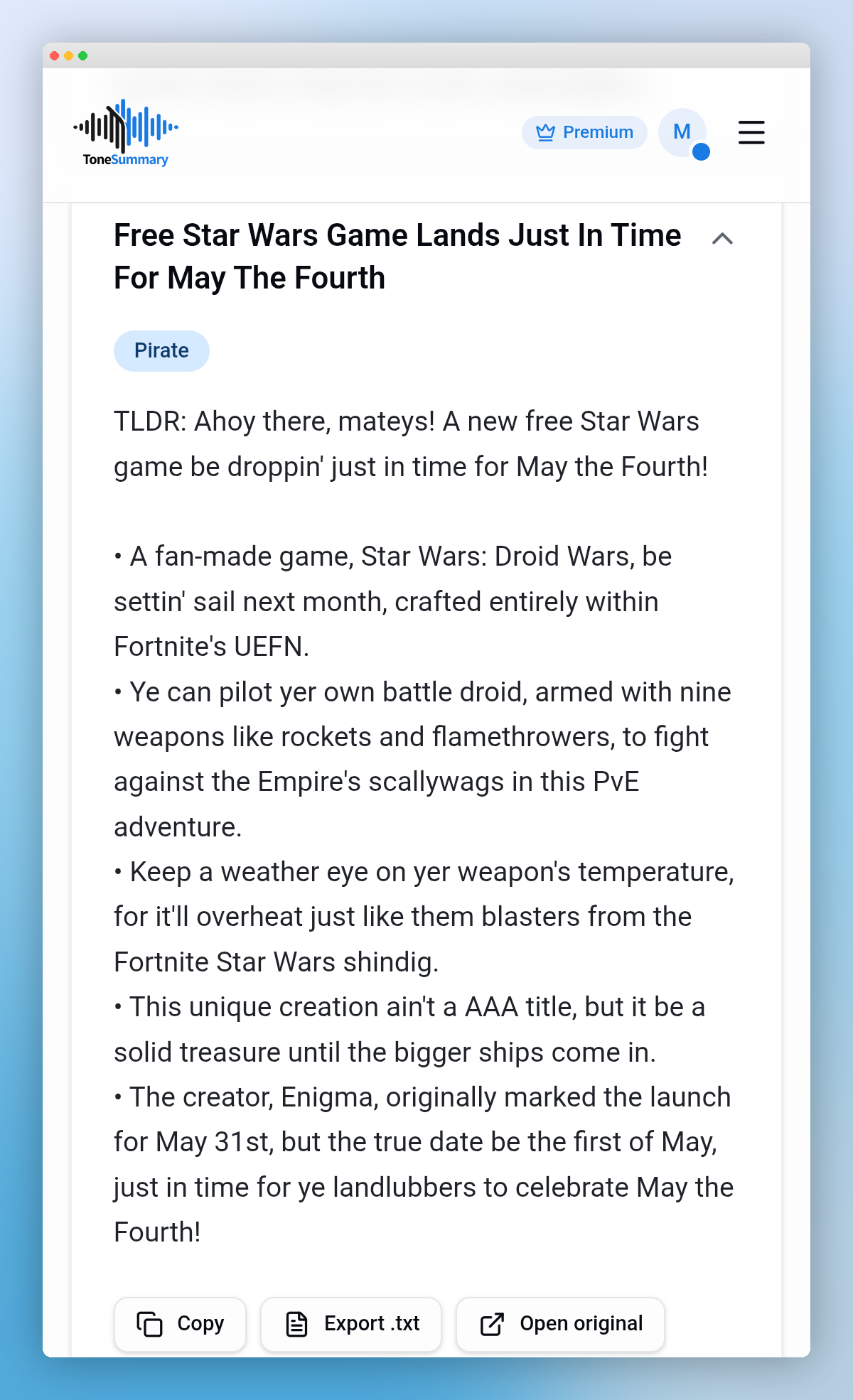
The Professional summary read like a games-news brief. Casual sounded like a friend in Discord. Funny landed actual jokes. The Pirate version (expanded below) reframed the whole article in pirate slang without dropping a single fact. No hallucinations across any of the five.
The structural advantage: every other tool on this list produces one summary, in one voice, per request. Matching what ToneSummary did in a single click would mean writing five separate prompts in ChatGPT and waiting for five generations.
2. ChatGPT — accurate but generic
Pasted the URL, asked for a summary. Got a clean, factually correct paragraph. Tone was the default ChatGPT voice: competent, slightly stiff, no personality. To get anything else, you have to write a longer prompt — 'summarize this in a casual Discord voice', etc. Fine if you enjoy prompt engineering. Slow if you don't.
3. Google Gemini — accurate, slightly more readable
Same drill, same accuracy. Gemini's default voice was marginally more conversational than ChatGPT's, but still single-tone. No way to get five voices without five separate prompts.
4. Claude — accurate, but hallucinated one small detail
Claude produced a well-written summary. But on close inspection it added a detail that wasn't in the source article — a minor embellishment about the developer's intent that wasn't actually claimed in the GamingBible piece.
It's the kind of thing 99% of readers wouldn't notice. But if you're summarizing for accuracy — research, journalism, briefings — that's the exact failure mode that makes AI summaries dangerous. Worth flagging.
5. Manual (human) summary — fastest if you've already read it
We wrote our own one-liner: 'A new fan-made Star Wars game has been built using the Fortnite UEFN engine — perfect timing for May the Fourth.' Took about 15 seconds. Obviously requires having read the article first, which defeats the purpose if you're trying to skip the reading.
Useful as a baseline though: any AI summary that's noticeably worse than this 15-second human attempt is failing.
6. TLDR This — gave up
Slow load. Multiple clicks through ad-heavy UI. After waiting for what felt like an age, the summary panel never showed the article content. Closed the tab. Did not get a usable summary out of this tool.
7. QuillBot — gave up
Couldn't find the URL paste field. UI is cluttered with paraphrasing tools, grammar checkers, and citation generators. The summarizer is buried somewhere but the navigation made it genuinely unclear how to start. Closed the tab.
Results: which AI summarizer actually worked?
Here's the side-by-side after running the same article through every tool:
| Tool | Result | Verdict |
|---|---|---|
| ToneSummary | 5 accurate summaries in 5 tones, single click | ✅ |
| ChatGPT | 1 accurate summary, generic tone, requires prompt work for variation | ✅ |
| Gemini | 1 accurate summary, slightly friendlier default | ✅ |
| Claude | 1 well-written summary, contained a minor hallucination | ⚠️ |
| Manual | Accurate but requires reading the article first | ✅ |
| TLDR This | Never produced a usable summary | ❌ |
| QuillBot | Couldn't figure out how to start | ❌ |
Verdict: what's actually the best way to summarize an article?
If you want a one-off summary and you're already paying for ChatGPT or Claude, they work — just expect a single voice and watch Claude for embellishment.
If you want to compare how an article reads in different voices — for sharing in Slack vs. a team brief vs. a tweet — ToneSummary is the only tool here that does it in one click. That's the structural difference. Everyone else makes you run the same article through five separate prompts.
If you tried TLDR This or QuillBot and bounced off the UI, you're not alone. We did too.
The real unfair advantage: a saved library of personas
Built-in tones are just the starting line. On Pro, ToneSummary lets you build a personal library of up to 10 saved tone presets — each one a fully defined voice you craft once and reuse forever with a single click.
And the range is genuinely wide open. Save 'Albert Einstein explaining it on a chalkboard.' Save 'Alan Turing in a 1940s lecture hall.' Save 'Shakespearean sonnet.' Save 'Pirate captain at the helm.' Save 'Yorkshire farmer explaining tech to his dog.' Save 'Boardroom brief for a sceptical CFO.' Define the persona once, then summarize any article in that voice on demand — no re-prompting, no copy-pasting instructions, no rebuilding the setup every session.
No other summarizer in this test gives you that built in. ChatGPT can roleplay a persona in any chat, and Custom GPTs let you bake one in — but each Custom GPT is a separate tool you have to leave the chat to switch into. Claude does it via Projects, where each Project holds one persona and takes real setup. Gemini's Gems work similarly — one persona per Gem, managed in a separate UI. TLDR This and QuillBot don't offer it at all. ToneSummary is the only tool here where 'summarize this like Einstein' lives as a one-click pill sitting right next to 'summarize this like a pirate' — same screen, same paste box, same click.
For anyone who summarizes regularly — content teams cycling between brand voices, newsletter writers serving different audiences, analysts switching between exec briefings and Slack threads — that's not a feature. That's the workflow.
Frequently asked questions
What's the most accurate way to summarize an article with AI?
In our test, ChatGPT, Gemini, and ToneSummary all returned factually accurate summaries. Claude added a small detail not present in the source — a reminder that no AI summarizer is 100% safe for high-stakes content without a human check.
Can AI summarizers hallucinate?
Yes. In our test, Claude added a detail about developer intent that wasn't in the original article. It was minor and most readers wouldn't notice — but for research, journalism, or briefings, always sanity-check AI summaries against the source.
What's the fastest way to summarize an article in multiple tones?
ToneSummary's batch mode returns summaries in five tones from a single click. Doing the same with ChatGPT or Claude requires writing five separate prompts and waiting for five generations.
Are there any AI summarizers that didn't work?
In our test, TLDR This never returned a visible summary after a long wait, and QuillBot's UI made it unclear how to even start. Both were abandoned.
Try each tone yourself
Every tone in this comparison has its own dedicated summarizer. Pick one and paste any article URL — no signup needed for the first few.
Try ToneSummary free
Paste any article URL and get an instant summary in your chosen tone. 5 free per day, no signup.
Summarize an article →Keep reading
The 7 Best AI Article Summarizers in 2026 (Tested & Compared)
We tested the top AI article summarizers of 2026 on speed, accuracy, and tone control. Here's how ToneSummary, ChatGPT, Claude, and others actually compare.
ReadHow to Summarize Any Article in 5 Seconds (Without Losing the Good Bits)
Long articles eat your day. Here's how to summarize any article in seconds — and actually keep the parts worth remembering.
ReadBeyond the Bullet Points: The Art of Summarizing Anything Effectively
Learn the essential techniques for summarizing any text effectively, from articles to meetings. Discover how AI tools like ToneSummary can streamline your summarization process.
Read